Description
This product is not shipped until the user can confirm that the computer vision model works. We want to give you the highest chance of this working.
You can request a full refund within about 3 days of you receiving the hardware and we’ll refund you, no questions asked and you can keep the hardware.
Please read all the pages of this website before buying to make sure this is even possible, to manage expectations and to give this the highest chance of working.
The safest Amazon Flex Bot.
Uses physical hardware to automate taps.
No monthly subscriptions.
No app to install on your phone. Automated physical taps.
Open source code and hardware (Python and Arduino), meaning you own the software and hardware and can reprogram it.
Beats human latency and bot detection.
No code actually runs on the phone.
All other bots are most likely going to get you banned at some point. Some computer vision bots simulate taps on the screen to do something similar to what this bot does, but it’s not possible to fake real taps because of telemetry and metadata data that comes from physical taps interacting with the digitizer that are not possible to fake. Amazon can detect fake taps and prove it. Other bots may try to access the API, but Amazon can detect that and prove that as well. All logic is handled on a computer, and there is complete isolation between the bot and the app. From the app’s perspective, there’s no code running on the phone, and there are physical taps coming the screen. This makes it extremely safe. The hard part – buying the hardware, installing the software and other prerequisites. The good news – you have the safest Amazon Flex bot for as long as the hardware lasts.
Managing your expectations
We only ship within the US.
Requires a Android device with developer mode enabled for scrcpy screen mirroring.
This has not been tested on a smartphone with a screen protector.
You cannot choose which Amazon Flex order you accept. The bot will try to accept the topmost order. You won’t know what order it is unless you accept it.
You need a windows 10/11 laptop/computer with two USB posts, and a means of moving the cursor.
You need two USB C cables. Your phone and computer will not be usable while the bot is running.
If Amazon really wanted to they could make this bot obsolete, although all other bots will be affected as well.
Understand that this is experimental and unpredictable. This uses physical hardware and a lot installed hardware. Anticipate that things may not work perfectly “out of the box”. After you place an order, you can contact me through either of these methods and I will attempt to answer any questions you might have and help you out
Email: [email protected]
Whatsapp number: 1 (580) 590-0258
What’s included
- Arduino-Breadboard kit with code already installed
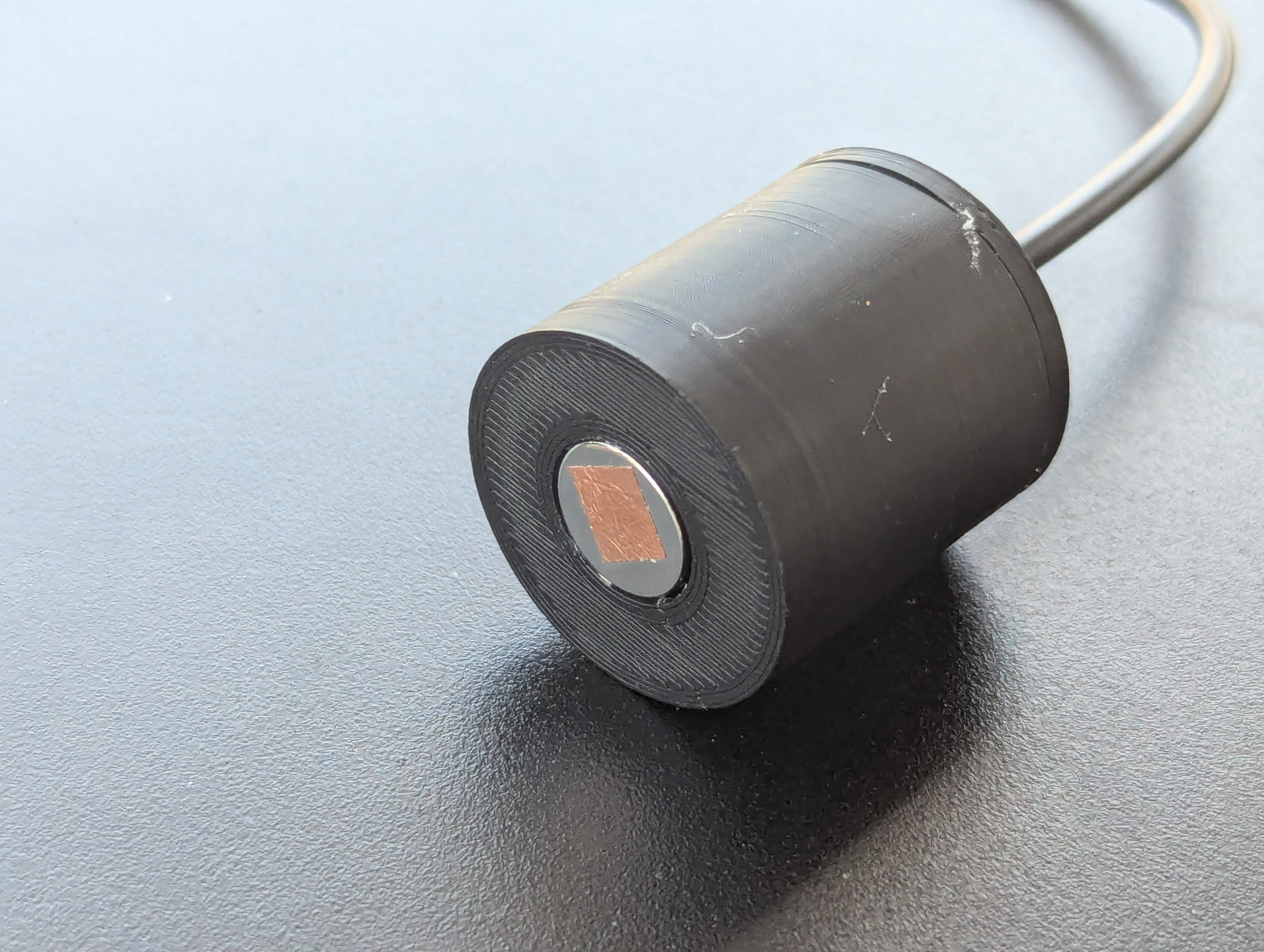
- 2 3D printed heads
- Some strips of conductive copper tape
- Immediate access to the digital files necessary for the bot
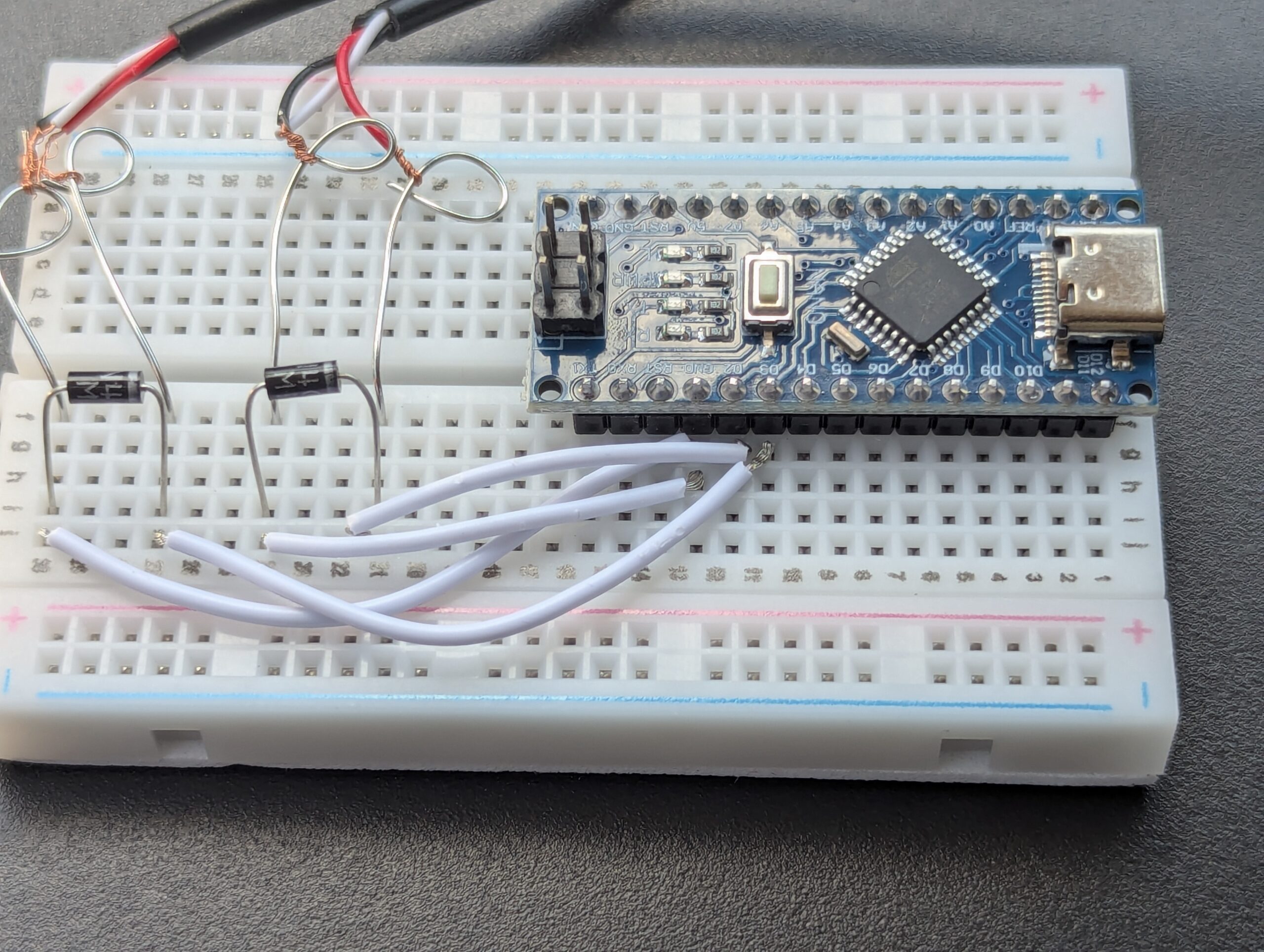
The hardware for the bot consists of an Arduino Nano which interacts via USB C to your computer/laptop. The hardware you receive has the surface hot glued so all the various components and stable, otherwise this would be the most annoying thing to use and the wires would disconnect all the time. You can see hot glue breadboards in the image library.
Contains two 3D printed heads which allow for automated tapping in two specific areas of the screen. Heads connect to the Arduino via 2.5 mm cables. These are the only physical tapping heads available. Based on the opening and closing of an SIP-1A05 relay. See the image library to learn more. YouTube videos showing the bot in action. It is in fact able to accept orders although I haven’t caught it on video yet.
Computer Vision Mechanical Tap Amazon Flex Bot test – YouTube
(In the video I’m using an early prototype version of the bot, but it’s still the same thing)
What you should do before purchasing. Please read all the pages of this website so you can feel confident that this will work, and so you can follow the next steps.
Instructions after you purchase the hardware. You get a link to zip file, which consists of run_scrcpy.bat, setup_phone.bat, bot.py, and the Arduino code. The Arduino code is already uploaded to the Arduino nano, but it’s included for completeness sake. Extract them to your desktop to make things easier. Follow this sequence.
- Run run_scrcpy.bat to mirror your very low resolution android screen. Maximize this screen to normalize things. The screen needs to be visible to read pixel values.
- Open setup_phone.py in Sublime Text. A GUI pops up that’s always on top. Open your scrcpy screen. Move the GUI to the left side of the screen. Follow the instructions, which involves navigating the Amazon Flex app and clicking on 3 specific areas to get RGB values and coordinates. The model of your phone is saved as a JSON file. If done correctly, you won’t need to run this file in the future because it’s just to create the model of your phone.
- Open bot.py in Sublime Text likewise. This is the primary bot and it uses the JSON model. A similar GUI pops up that is also always on top. Open your scrcpy screen and move the GUI to the left so it can read screen values. Navigate the app and make sure the bot recognizes which screen is which. There’s 3 screens to recognize, and it should recognize the state of the buttons.
The GUI has a means of manually sending taps and modifying their duration as well for testing purposes. Do not spam taps. Because you don’t have the hardware, you won’t be able to connect and you won’t be able to send taps to your phone, but you can still see what it would look like. If the GUI doesn’t recognize the screen or the state of the relevant buttons, then the bot will not work.
Verify that the model works, and we’ll ship your hardware. Please try do this within a gew days after you purchase, otherwise we’ll refund you.
Instructions after you receive the hardware in the mail and created the model of your phone.
Test the heads to make sure they work. A small built-in LED on the Arduino nano should flash every time you send a tap.
Finally after all that , if you actually want to accept an Amazon Flex order, this is what you’ll most likely do.
Connect the arduino and phone to your laptop and computer (2 USB C cables and 2 USB ports required, and a means to move the cursor).
Run the run_scrcpy.bat file.
Maximizing scrcpy screen.
Running bot.py in Sublime Text.
Open the maximized scrcpy screen.
Move the bot.py GUI to the left side of your screen.
Navigating to the starting area on your phone (no orders screen).
Placing the heads on the phone in two specific locations.
Testing the heads to make sure they work.
Start the bot, and wait patiently until you get an order.
Troubleshooting Guide: If the GUI recognizes the screens and button states, and you can successfully send taps on both heads via the manually tapping testing grounds, then the bot will work.
Most of the problems arise in not being able to send taps.
If that happens, here’s what you can try.
Remove any screen protector.
Use a larger piece of the copper foil tape. The piece can actually be pretty large. The copper foil tape is necessary since the metal contact is never perfectly touches the screen.
Contact of with the phone surface is extremely important. You can yse a rubberband to hold down the head to ensure the highest possible contact.
Make sure the contacts near the breadboard aren’t touching.
Close the bot GUI and re-start the Python program.
Switch the heads.
Reviews
There are no reviews yet.